Remote Control Lawn Mower
Troubleshooting Guide

Complete step-by-step solutions for every SAAO remote control lawn mower model.

Won't Start Battery Issues Remote Control Engine Problems Cutting Issues Tracks & Wheels Maintenance Safety Features

Mower Won't Start

Follow these 6 steps in order before contacting support

1

Emergency Stop Button

The emergency stop is the most common cause. Make sure the red mushroom button on the mower is fully released (pulled out). If it's pressed in, the mower will not start. Pull it outward firmly until it clicks into the released position.

2

Ignition Switch

Turn the ignition key to the ON position. On electric models, press and hold the power button for 3 seconds until the indicator light turns solid. Ensure the key is fully seated and not in the OFF or ACC position.

3

Battery Charge

Check the 12V starter battery voltage with a multimeter. A healthy battery should read 12.6V or higher. Below 12.2V indicates a discharged battery. Charge fully before attempting to start. On electric models, ensure the main battery pack is charged above 20%.

4

Fuel System

Check that the fuel valve is in the OPEN position. Press the primer bulb 3-5 times until you feel resistance. Use fresh gasoline (less than 30 days old). Old fuel is a leading cause of starting issues. Drain and replace if the mower has been sitting idle.

5

Cable Connections

Inspect all wire connections between the battery, starter, ignition switch, and control board. Look for loose, corroded, or disconnected wires. Tighten any loose terminals and clean corroded contacts with a wire brush. Pay special attention to the battery terminal connections.

6

Safety Switches

Check the seat occupancy switch (if equipped) — it must detect weight or be bypassed for maintenance. Inspect the tilt sensor — if the mower is on a slope beyond its rated angle, it will not start. Ensure the mower is on level ground during startup.

Battery Issues

Battery Won't Hold Charge

  • Check charger LED indicator — solid green means fully charged, red means charging
  • Verify electrolyte water level in lead-acid batteries (add distilled water if low)
  • Check for BMS lock on lithium batteries — reset by disconnecting for 10 minutes
  • Test battery under load — a battery may show 12V but fail under startup current
  • Replace battery if more than 3 years old or if voltage drops below 11.5V under load

Electric Models: Runtime Too Short

  • Battery aging — lithium batteries lose capacity after 500+ charge cycles
  • Cold weather reduces battery capacity by 20-40% — store and charge at room temperature
  • Thick or wet grass draws more power — raise cutting height or mow when dry
  • Check for parasitic drain — battery should lose less than 5% per week in standby
  • Upgrade to higher capacity battery pack if runtime is consistently insufficient

Gas Models: Starter Battery Dead

  • Charge the battery after every 5 sessions of use — don't let it sit discharged
  • Inspect terminals for corrosion — clean with baking soda and wire brush
  • Check for parasitic drain from wiring faults or aftermarket accessories
  • Use a battery tender/maintainer during off-season storage
  • Replace battery every 2-3 years or if it fails to hold charge overnight

Remote Control Not Working

Remote Not Connecting

  1. Power on the mower first, wait 5 seconds for system initialization
  2. Power on the remote control
  3. Press and hold the pairing button on the remote for 5 seconds until LED flashes green
  4. Wait up to 30 seconds for connection to establish — LED will turn solid green
  5. Check remote batteries — weak batteries cause intermittent connection
  6. Extend the antenna fully on the remote control
  7. Avoid operating near power lines, radio towers, or other strong RF sources

LED Indicator Meanings

LED Pattern Status
Solid Green Ready — connected and operational
Flashing Green Pairing mode — searching for mower
Flashing Red Low battery in remote — charge or replace batteries
Solid Red Fault detected — check mower error codes

Controls Response Slowly

  • Perform joystick calibration — center both sticks, press and hold the calibration button for 10 seconds
  • Check for RF interference from other devices — change operating frequency if available
  • Reduce distance to the mower — signal quality degrades beyond 80% of rated range
  • Check remote antenna connection — loose antenna reduces signal strength significantly

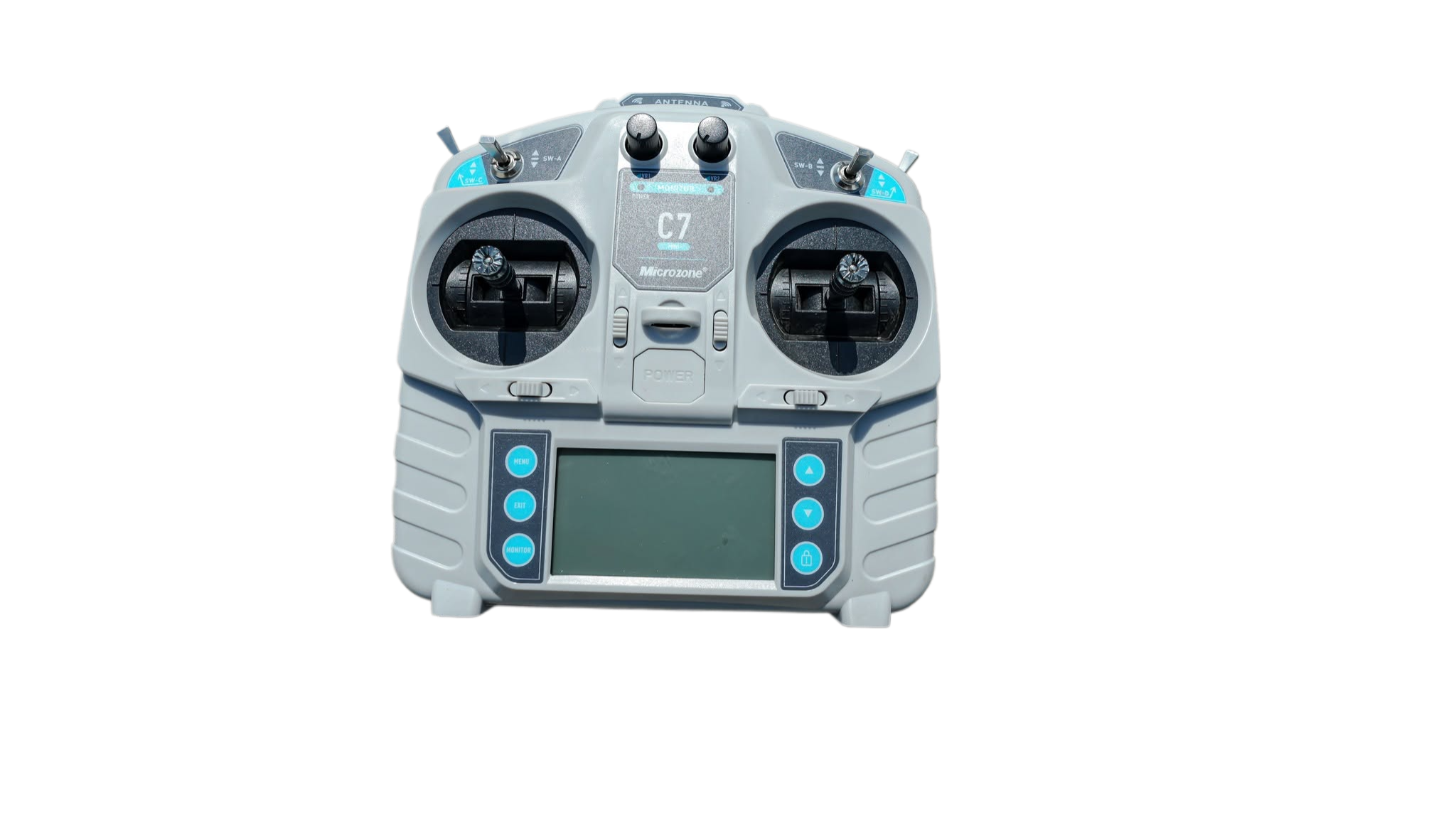
Remote Control Overview

Remote Control

Familiarize yourself with the remote control layout. The antenna, joysticks, emergency stop, and LED indicators are key components for troubleshooting connection or control issues.

Engine Problems

Engine Starts But Dies

  • Verify fuel valve is fully in the OPEN position
  • Replace spark plug if fouled or worn — gap should be 0.7-0.8mm
  • Clean or replace air filter — dirty filter starves engine of air
  • Check choke position — fully open for warm starts, partially closed for cold starts
  • Inspect fuel line for kinks or blockages

Unusual Noises

  • Grinding: Shear bolts may be broken — check and replace blade mounting bolts
  • Squealing: Drive belt is worn or loose — inspect for cracks and adjust tension
  • Knocking: Low oil level — check immediately and add oil if needed
  • Vibration: Bent or damaged blade — remove and inspect, replace if necessary

Engine Overheating

  • Check engine oil level — low oil causes rapid overheating
  • Clean cooling fins on the engine cylinder — debris blocks airflow
  • Limit continuous run time to 45 minutes in hot weather
  • Ensure air vents on the mower body are not blocked

Cutting Issues

Grass Not Cut Evenly

  • Sharpen blades — dull blades tear grass instead of cutting cleanly
  • Level the mower deck using adjustment bolts — check front-to-back and side-to-side
  • Adjust cutting height — too low causes scalping on uneven terrain
  • Check tire/track pressure for even stance on both sides

Mower Stalls in Thick Grass

  • Increase cutting height — tall, dense grass requires higher deck setting
  • Slow down ground speed — give the blade time to cut through thick growth
  • Make a double pass — first pass at high height, second at desired height
  • Check blade sharpness — dull blades increase engine load significantly

Can't Adjust Cutting Height

  • Check electric height adjustment motor — listen for motor noise when adjusting
  • Lubricate the height adjustment linkage with silicone spray
  • Verify the remote control signal for height adjustment is functioning
  • Inspect for bent or jammed height adjustment mechanism

Tracks & Wheels

Mower Pulls to One Side

  • Check track tension — both tracks must have equal tension
  • Remove debris wrapped around the drive sprockets or wheel axles
  • Verify both drive motors are running — test each motor independently
  • Inspect for uneven tire wear or track wear patterns

Track Coming Off

  • Adjust track tension to manufacturer specifications
  • Clean debris from track guide rollers and sprockets
  • Check for worn or damaged guide rollers that no longer hold alignment
  • Inspect track for tears or stretched sections requiring replacement

Drive Motor Not Responding

  • Check wiring connections to the non-responsive motor
  • Test the motor directly by applying voltage — if it runs, the issue is in the controller
  • Check if the brake is engaged — some models have automatic parking brakes
  • Inspect the motor controller for burnt components or error codes

Maintenance Schedule

Regular maintenance prevents most troubleshooting issues

Task Frequency Models
Check oil level Before every use Gas / Diesel
Check battery charge Before every use All models
Clean air filter Every 25 hours Gas / Diesel
Replace engine oil Every 50 hours Gas / Diesel
Sharpen or replace blades Every 20-25 hours All models
Replace spark plug Every 100 hours Gas
Inspect tracks / tires Monthly Tracked models
Lubricate pivot points Every 50 hours All models
Check drive belt Every 200 hours Belt-drive models
Full professional service Annually All models

Safety Features

Understanding these features helps you identify when they're working correctly

Emergency Stop

Red mushroom button on the mower body. Press to immediately shut down all functions. Pull out to release and reset. Must be released before the mower will start.

Signal Loss Stop

If the remote signal is lost for more than 3 seconds, the mower automatically stops all movement and blades. It will resume when signal is re-established.

Tilt Sensor

Detects if the mower exceeds its rated slope angle. Automatically stops the engine and engages brakes to prevent rollover. Must be on level ground to restart.

Blade Brake

Stops the cutting blade within 3 seconds when the remote command is given or emergency stop is activated. Blades stop before the drive system for added safety.

Can't Fix It? We're Here.

If the steps above didn't resolve your issue, contact our support team with your mower model, serial number, and a description of the problem. We'll get you back mowing.

Get Support Now

Chat with us for real-time troubleshooting assistance and expert technical support.

Start Conversation
Chat with us